AI Super Scale in DaVinci Resolve iPad: Upscale Low Resolution Footage
In this article/video i will show you how to use the AI Super Scale feature in DaVinci Resolve for iPad to upscale low resolution footage. With DaVinci Resolve Version 20 we now even have 3x and 4x advanced super scale options. Let me show you how it works.
Pro Tip: Make your Videos Cinematic (and save a tone of time) with our Seamless Transition Pack for DaVinci Resolve iPad.

Contents
- [Video] I Upscaled My Footage 400% on an iPad: The Results Are Not What You Expect
- How to use AI Super Scale in DaVinci Resolve for iPad
- AI Super Scale Modes: 2x, 3x and 4x
- Sharpness and Noise Reduction
- If you want to host your own Online Course use CC360
- BONUS: All DaVinci Resolve iPad Masterclass Students get the Transition Pack & the 8K Film Grain Pack for FREE!
[Video] I Upscaled My Footage 400% on an iPad: The Results Are Not What You Expect
How to use AI Super Scale in DaVinci Resolve for iPad
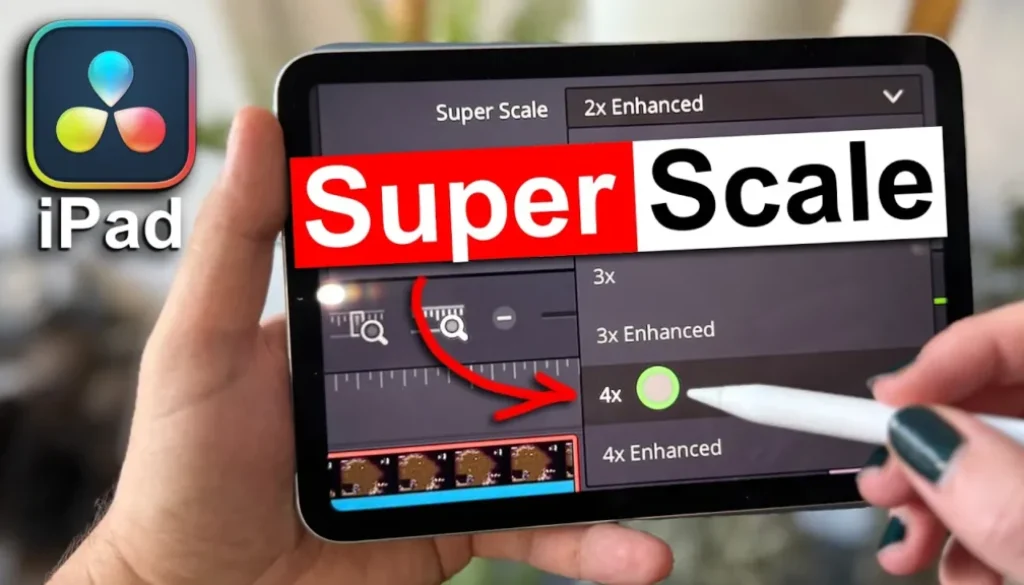
If you have a clip that is low in resolution and you want to upscale it, select your clip in the timeline. Then open the Inspector and go to the first tab. Scroll down until you see the AI Super Scale option and activate it.

AI Super Scale Modes: 2x, 3x and 4x
Once you activate AI Super Scale you can choose which mode you want to use. You have 2x, 2x Enhanced, 3x, 3x Enhanced, 4x and 4x Enhanced. The 3x and 4x options are new with DaVinci Resolve Version 20. If you use the Enhanced versions, they will use more resources. So be careful with this one. It will make your videos laggy and it will take more time to render.

Sharpness and Noise Reduction
Below the mode selection you can also change the Sharpness and the Noise Reduction. This gives you extra control over the quality of your upscaled footage.
AI Super Scale is just one of the many new features that came with DaVinci Resolve Version 20 on the iPad. I created a complete video breaking down all of the new features. Definitely check that one out here: DaVinci Resolve iPad Version 20.0 – All Features explained.
Tip: If you don’t know how to get the other pages (FUSION, FAIRLIGHT, EDIT) on the iPad read this article first: How to UNLOCK ALL PAGES in DaVinci Resolve for iPad Pro
If you want to host your own Online Course use CC360
I really believe, that CC360 is the best Platform to host your own Online Course currently on the market. And each week they introduce new features. Amazing. Check it out here.
BONUS: All DaVinci Resolve iPad Masterclass Students get the Transition Pack & the 8K Film Grain Pack for FREE!
You can either get the Transition Pack separate here: Seamless Transition Pack for DaVinci Resolve iPad. Or the 8K Film Grain Pack here: 8K Film Grain Bundle. but all of our DaVinci Resolve iPad Packs are a FREE Bonus for the DaVinci Resolve iPad Masterclass Students.
Check It Out here DaVinci Resolve iPad MasterClass: From Beginner To Pro.
Read Next
• How COPY Color Grade to MULTIPLE Clips in DaVinci Resolve iPad
• DO THIS to make DaVinci Resolve FASTER! (Instead of rage smashing your iPad)
• How To Delete Cache Files in DaVinci Resolve iPad
• How To Color Correct iPhone Footage in DaVinci Resolve iPad
• Easy Sync Audio & Video in DaVinci Resolve iPad