Apple Said They’d Never Do It… 10 Years of Touchscreen Laptops Taught Me This
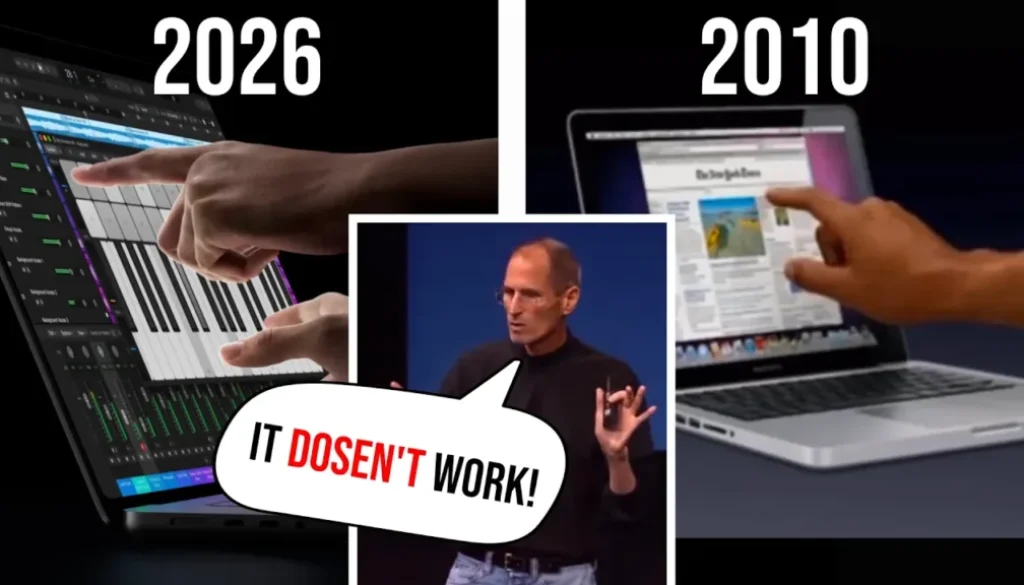
The new MacBook Pro with touchscreen just came out. In this article/video I share my experience from two Dell XPS laptops with touchscreens that I used before I ever owned a Mac, why I think a touchscreen on a laptop is not ergonomic, and the one light I see at the end of the tunnel.
Pro Tip: Make your Videos Cinematic (and save a tone of time) with our Seamless Transition Pack for DaVinci Resolve iPad.

Contents
- [Video] Touchscreen MacBook Pro: Steve Jobs Was Right?
- What Steve Jobs said about touchscreen laptops
- My experience with touchscreen laptops (Dell XPS 13 and XPS 15)
- Why I switched from Dell XPS to Apple for video editing
- Why Apple M chips are so efficient (ARM vs x86)
- Lenovo Yoga and Microsoft Surface tried to solve it
- DaVinci Resolve on the touchscreen MacBook Pro
- Finger vs Apple Pencil on the iPad
- Will the MacBook Pro and iPad Pro merge?
- The light at the end of the tunnel
- If you want to host your own Online Course use CC360
- BONUS: All DaVinci Resolve iPad Masterclass Students get the Transition Pack & the 8K Film Grain Pack for FREE!
[Video] Touchscreen MacBook Pro: Steve Jobs Was Right?
What Steve Jobs said about touchscreen laptops
Years ago Steve Jobs said Apple had tested touchscreens on laptops a lot and it just doesn’t work. A vertical touch surface gives a great demo, but after a short time your arm gets tired. In his words it is “ergonomically terrible”. Touch surfaces want to be horizontal, and that’s why we have the iPad.
I had to laugh so much when I saw that clip again, because I agree. And I have the experience to back it up.
My experience with touchscreen laptops (Dell XPS 13 and XPS 15)
I left Germany in 2015, started traveling and worked in Vancouver in the movie industry on productions like Maze Runner 3 and Supernatural. That inspired me to start my own business. I built that business on my Dell XPS 13, the first version of the small XPS that was competing with the MacBook. I ran Premiere Pro, Photoshop and the whole Adobe Suite on it and even wrote my first book on that machine.
That laptop already had a touchscreen. I even bought a stylus for it and made videos on my channel showing how to use it. But the problem is where the display sits. When I wanted to draw in Photoshop I sometimes flipped the laptop down so it was lying weirdly on the table, just so I could draw on it.
When I draw on my iPad today, I have it lying flat, like on a book. I never really draw on a screen that stands up. It’s just not ergonomically feasible.
Why I switched from Dell XPS to Apple for video editing
Because I was already in the Dell ecosystem, my second laptop was the Dell XPS 15 with an i9. It had a 4K touchscreen and it was a beast on paper, but it was throttling all the time. It was faster than the XPS 13, but editing videos was still lagging a lot. And the touchscreen? I never really used it.
Then I got my first iPad with the M1 chip and suddenly I could edit 4K videos in my timeline without lag. I was like, what is happening? That’s why I switched to Apple. Not because I wanted to be in the Apple ecosystem, but because video editing became so much more reliable. No throttling problems.
• Dell XPS 15 (maxed out): about $3,500
• MacBook Pro M2 Pro with 1 TB storage: about $2,500
The MacBook was cheaper and still has better performance today.
Why Apple M chips are so efficient (ARM vs x86)
Most Intel chips are still based on x86. That architecture needs more power and creates more heat. Apple’s M chips are ARM based, an architecture that goes back to the 80s and was developed further in our smartphones, where battery life matters a lot. I read that Apple once asked Intel to make the chips for the iPhone, and Intel didn’t see a future in it. So Apple was kind of forced to build their own chips, and that’s what we benefit from today.
Lenovo Yoga and Microsoft Surface tried to solve it
Two devices tried to fix the ergonomics problem in the past. The Lenovo Yoga with its 360 degree hinge, where you flip the keyboard to the back so you have something like a tablet. But that’s so awkward on your lap. And the Microsoft Surface, where the whole computer sits in the screen and you can detach it like an iPad. The problem with both was that they were not in the same ballpark when it comes to efficiency and power. They would need something like the M chips.
DaVinci Resolve on the touchscreen MacBook Pro
To be fair, Apple is now optimizing the UI for touch and they can take a lot from the iPad experience. I saw a video where DaVinci Resolve was presented on the new MacBook Pro, showing how easy it is to drag and drop with your finger. I had to smile, because they could only show that so easily because Blackmagic Design has been developing the touch interface for DaVinci Resolve on the iPad for years. It’s the same software at its core, so the touch controls we know from the iPad are probably already in there. That is kind of cool.
What I haven’t seen yet is Apple Pencil support on the MacBook Pro.
Finger vs Apple Pencil on the iPad
Even on my iPad in the Magic Keyboard I’m not using my finger most of the time. I use keyboard shortcuts to move through the timeline very fast and the Apple Pencil for everything that needs to be precise. That combination is what makes me fast. A finger on a vertical screen can’t replace that.
Will the MacBook Pro and iPad Pro merge?
Here’s my take. In the future there will be just one tablet that can run all the software because the power is strong enough, and you just buy the accessories like the Magic Keyboard. Basically like the iPad now. Many people say the iPad is limited by its software, and that’s true. But I see it firsthand in video editing: with software like DaVinci Resolve we get better and better apps on the iPad. The real limit is what Apple allows developers to do on iPadOS.
But as long as Apple can sell us both a MacBook and an iPad, they will try to make as much money as possible with both. Until a competitor forces them to push it. My prognosis is that it will probably take another 10 years until they maybe cannibalize one of the products. As long as we keep buying both, they will keep selling both.
The light at the end of the tunnel
Shout out to my friend Johan in Germany. He said that when touchscreen laptops came out 10 years ago, the software was not adjusted to it and neither were we. That matches my experience. I had amazing touchscreen hardware, but the Windows touch experience was just garbage. Now the UI is optimized like on an iPad.
And we are growing up with touchscreens on our phones all the time. Kids walk up to any screen and try to touch it. I catch myself doing the same sometimes. So I give it that: touchscreens on laptops might be good in the future. I think this MacBook Pro is the first step towards a fusion of the MacBook Pro and the iPad Pro. We will see how that looks.
Let me know in the comments of the video what you think about the touchscreen MacBook Pro. Are you getting one? And are you getting one because of the touchscreen?
Tip: If you don’t know how to get the other pages (FUSION, FAIRLIGHT, EDIT) on the iPad read this article first: How to UNLOCK ALL PAGES in DaVinci Resolve for iPad Pro
If you want to host your own Online Course use CC360
I really believe, that CC360 is the best Platform to host your own Online Course currently on the market. And each week they introduce new features. Amazing. Check it out here.
BONUS: All DaVinci Resolve iPad Masterclass Students get the Transition Pack & the 8K Film Grain Pack for FREE!
You can either get the Transition Pack separate here: Seamless Transition Pack for DaVinci Resolve iPad. Or the 8K Film Grain Pack here: 8K Film Grain Bundle. but all of our DaVinci Resolve iPad Packs are a FREE Bonus for the DaVinci Resolve iPad Masterclass Students.
Check It Out here DaVinci Resolve iPad MasterClass: From Beginner To Pro.
Read Next
• How COPY Color Grade to MULTIPLE Clips in DaVinci Resolve iPad
• DO THIS to make DaVinci Resolve FASTER! (Instead of rage smashing your iPad)
• How To Delete Cache Files in DaVinci Resolve iPad
• How To Color Correct iPhone Footage in DaVinci Resolve iPad
• Easy Sync Audio & Video in DaVinci Resolve iPad