How To TURN OFF iPhone CAMERA CONTROL!
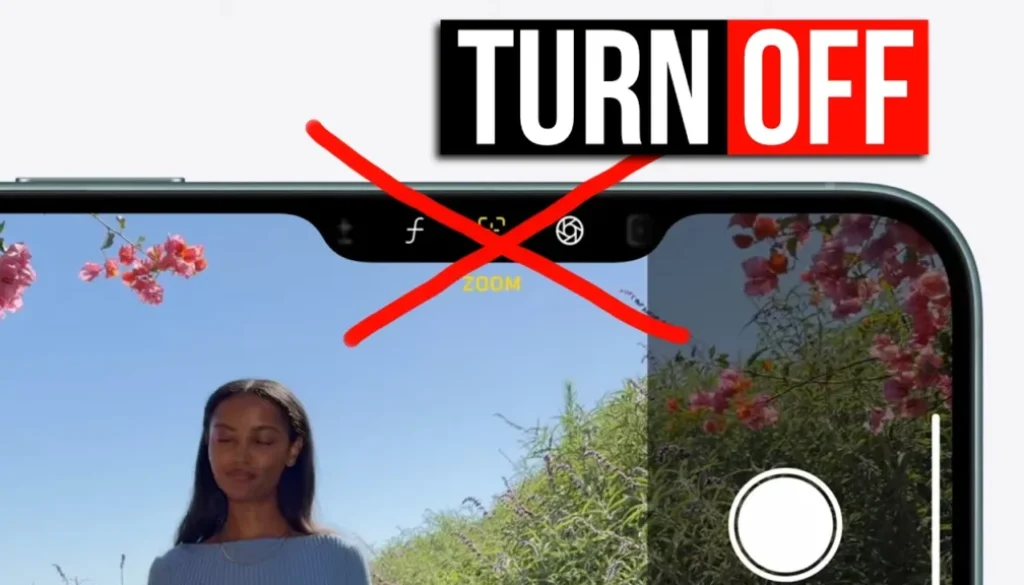
In this article/video i will show you how to turn off the camera control button on your iPhone. If you are like me and you keep accidentally pressing it, this will be a game changer for you. Let me show you how to disable it step by step.
Pro Tip: Make your Videos Cinematic (and save a tone of time) with our Seamless Transition Pack for DaVinci Resolve iPad.

Contents
- [Video] How to Turn Off the Camera Control Button on iPhone
- How to Turn Off the Camera Control Button on iPhone
- Change What the Camera Control Button Opens
- How to Disable Camera Adjustments
- How to Turn Off Camera Control Completely on iPhone
- If you want to host your own Online Course use CC360
- BONUS: All DaVinci Resolve iPad Masterclass Students get the Transition Pack & the 8K Film Grain Pack for FREE!
[Video] How to Turn Off the Camera Control Button on iPhone
How to Turn Off the Camera Control Button on iPhone
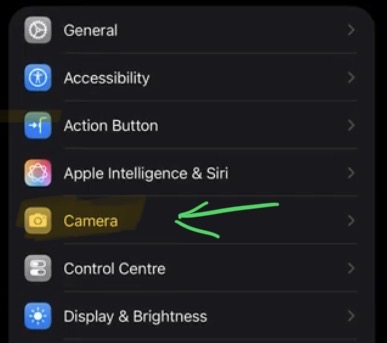
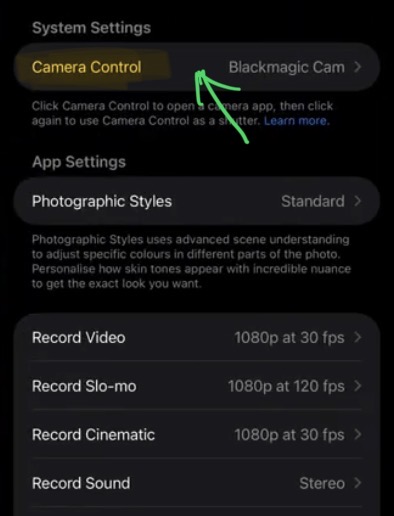
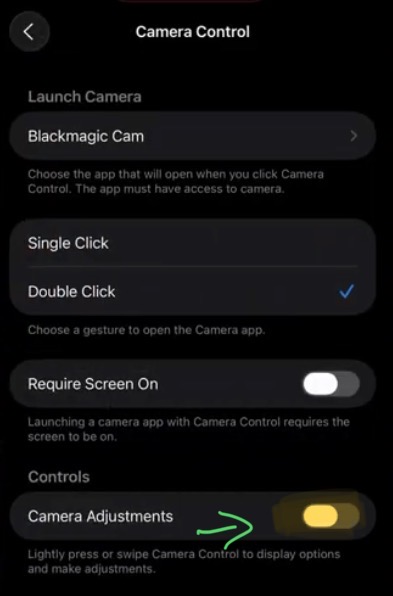
First open the Settings app on your iPhone and scroll down to Camera. At the top of the Camera settings you will find the Camera Control section.
Change What the Camera Control Button Opens
Before you turn it off completely, you should know that you can actually change what the camera control button opens. For example, you can set it to open a third-party camera app like the Blackmagic Camera app instead of the default camera. But if you don’t want to use it at all, keep reading.
How to Disable Camera Adjustments
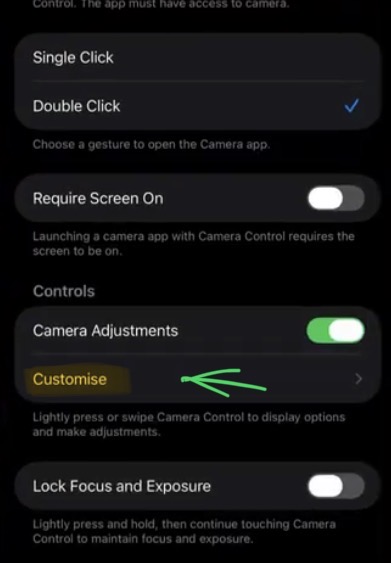
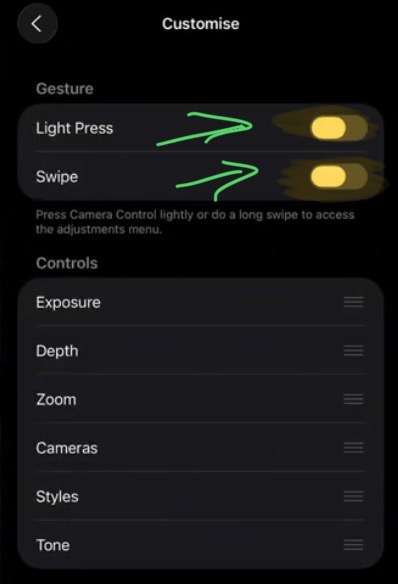
Under Camera Adjustments tap on Customize. Here you can turn off all the individual adjustment options one by one. You can also turn off the Camera Adjustments toggle completely so none of those settings are accessible through the camera control button.
How to Turn Off Camera Control Completely on iPhone
To fully disable the camera control button go to the Accessibility option and turn off Camera Control completely. After this the button has no function at all. You can now hold your iPhone and use the camera without accidentally changing any settings. This was a game changer for me.
If you want to host your own Online Course use CC360
I really believe, that CC360 is the best Platform to host your own Online Course currently on the market. And each week they introduce new features. Amazing. Check it out here.
BONUS: All DaVinci Resolve iPad Masterclass Students get the Transition Pack & the 8K Film Grain Pack for FREE!
You can either get the Transition Pack separate here: Seamless Transition Pack for DaVinci Resolve iPad. Or the 8K Film Grain Pack here: 8K Film Grain Bundle. but all of our DaVinci Resolve iPad Packs are a FREE Bonus for the DaVinci Resolve iPad Masterclass Students.
Check It Out here DaVinci Resolve iPad MasterClass: From Beginner To Pro.
Read Next
• How COPY Color Grade to MULTIPLE Clips in DaVinci Resolve iPad
• DO THIS to make DaVinci Resolve FASTER! (Instead of rage smashing your iPad)
• How To Delete Cache Files in DaVinci Resolve iPad
• How To Color Correct iPhone Footage in DaVinci Resolve iPad
• Easy Sync Audio & Video in DaVinci Resolve iPad