IN & OUT Buttons are gone ??? (DaVinci Resolve)
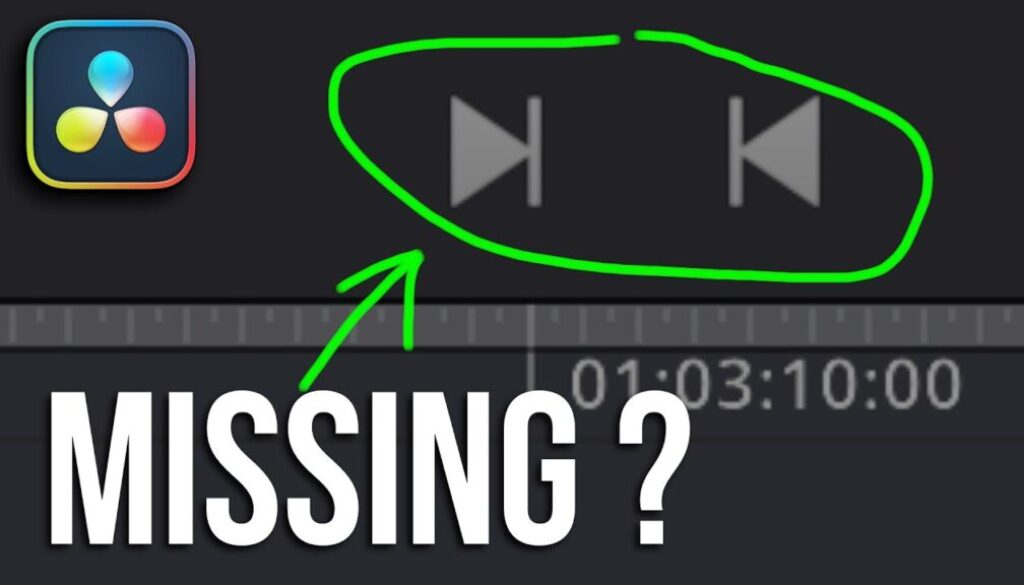
In this article/video I will show you a difference I noticed between the desktop version and the iPad version of DaVinci Resolve. The In and Out point buttons are missing in the Cut Page preview window on the desktop version, but they are still available on the iPad. I also contacted Blackmagic Support about this issue.
Pro Tip: Make your Videos Cinematic (and save a tone of time) with our Seamless Transition Pack for DaVinci Resolve iPad.

Contents
- [Video] In and Out Point Buttons MISSING in Cut Page on Desktop but NOT on iPad
- In and Out Point Buttons Missing in the Cut Page on Desktop
- In and Out Point Buttons Are Available on the iPad
- You Can Still Use Keyboard Shortcuts I and O
- Blackmagic Support Response
- UPDATE: The Buttons went never missing
- If you want to host your own Online Course use CC360
- BONUS: All DaVinci Resolve iPad Masterclass Students get the Transition Pack & the 8K Film Grain Pack for FREE!
[Video] In and Out Point Buttons MISSING in Cut Page on Desktop but NOT on iPad
In and Out Point Buttons Missing in the Cut Page on Desktop
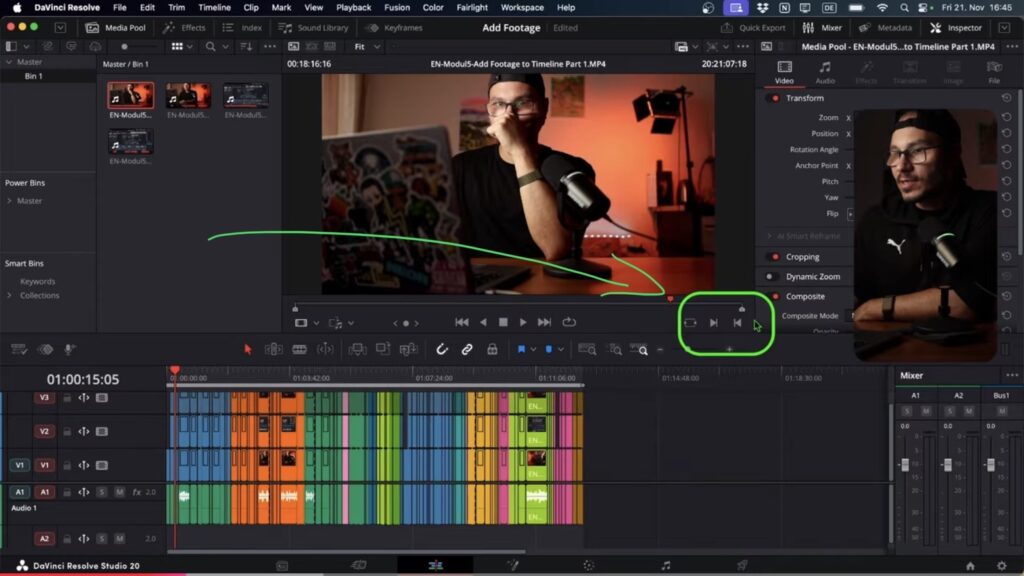
If you open the Cut Page on the desktop version of DaVinci Resolve and click on the timeline, you can see the In point and Out point buttons. But when you go into the media pool and open any clip in the preview window, these two buttons are missing.
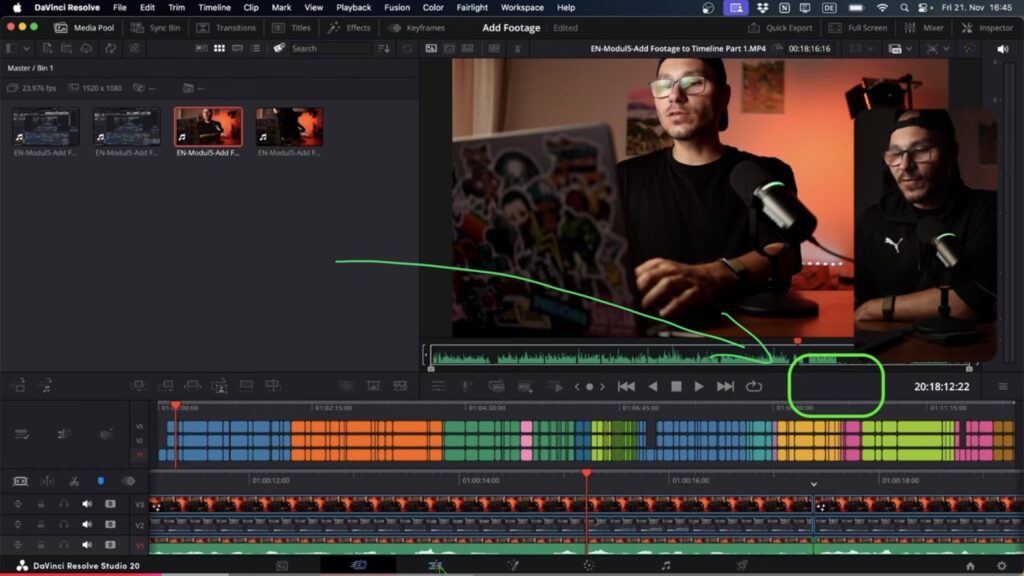
The funny thing is, if you go to the Edit Page on the desktop and open a clip there, the In and Out point buttons are available. So this issue only happens in the Cut Page on the desktop version.
In and Out Point Buttons Are Available on the iPad
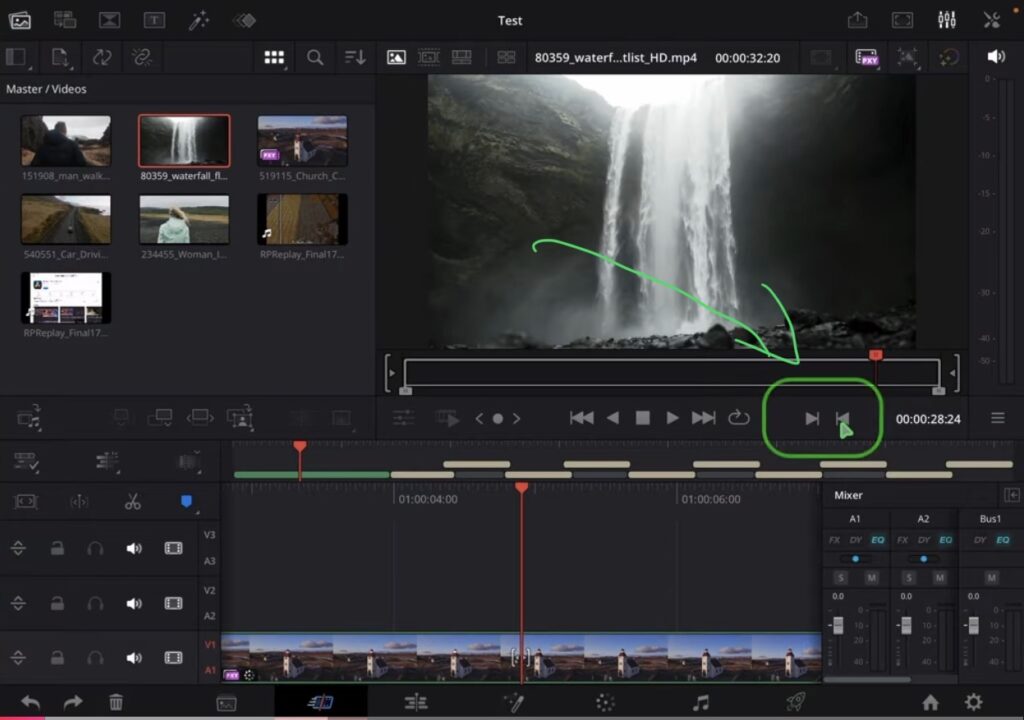
On the iPad version of DaVinci Resolve, the In and Out point buttons work as expected. If you go to the Edit Page and click on something, you see the In and Out point. If you go to the Cut Page and click on anything, the In and Out point buttons are there too. You can select them and use them without any issues.
You Can Still Use Keyboard Shortcuts I and O
Even though the buttons are missing on the desktop Cut Page, you can always use the keyboard shortcuts I (for In point) and O (for Out point). This still works fine. But in the past these buttons were visible in the Cut Page on the desktop as well, and since a couple of updates they are gone.
Blackmagic Support Response
I contacted Blackmagic Support about this issue. I explained that since a couple of updates, the buttons for setting the In and Out point in the preview window are missing in the Cut Page on the desktop. On the Edit Page the two buttons are available. And on the iPad version these two buttons are available in the Cut Page as well.
Blackmagic Support responded and asked for screenshots and diagnostic log files. To be honest, this is not an issue that happened because of something I did. This is how DaVinci Resolve looks after a fresh restart without editing anything. So I made this video to show the issue clearly and also to ask you guys if you have the same problem on your desktop version.
Let me know in the comments if you see the In and Out point buttons in the Cut Page on your desktop version. And also let me know if you see them on your iPad, because on both my iPad Mini and iPad Pro the buttons are there.
UPDATE: The Buttons went never missing
The In and Out Point buttons in the Cut Page source viewer were never there on the Desktop version in the first place. Here watch the response from Blackmagic Design in this Video/Article: IN & OUT Buttons are gone ??? (UPDATE…)
Tip: If you don’t know how to get the other pages (FUSION, FAIRLIGHT, EDIT) on the iPad read this article first: How to UNLOCK ALL PAGES in DaVinci Resolve for iPad Pro
If you want to host your own Online Course use CC360
I really believe, that CC360 is the best Platform to host your own Online Course currently on the market. And each week they introduce new features. Amazing. Check it out here.
BONUS: All DaVinci Resolve iPad Masterclass Students get the Transition Pack & the 8K Film Grain Pack for FREE!
You can either get the Transition Pack separate here: Seamless Transition Pack for DaVinci Resolve iPad. Or the 8K Film Grain Pack here: 8K Film Grain Bundle. but all of our DaVinci Resolve iPad Packs are a FREE Bonus for the DaVinci Resolve iPad Masterclass Students.
Check It Out here DaVinci Resolve iPad MasterClass: From Beginner To Pro.
Read Next
• How COPY Color Grade to MULTIPLE Clips in DaVinci Resolve iPad
• DO THIS to make DaVinci Resolve FASTER! (Instead of rage smashing your iPad)
• How To Delete Cache Files in DaVinci Resolve iPad
• How To Color Correct iPhone Footage in DaVinci Resolve iPad
• Easy Sync Audio & Video in DaVinci Resolve iPad