DaVinci Resolve iPad UPDATE: Legacy Speed Mode Retime Curve (Explained)
DaVinci Resolve for iPad got a new update and we are now on Version 21.0.3. This is a very small update with mostly bug fixes, but there is one change that is actually a big deal if you work with speed ramps. In this article i show you the new Legacy Speed Mode and the full changelist of this update.
Pro Tip: Make your Videos Cinematic (and save a tone of time) with our Seamless Transition Pack for DaVinci Resolve iPad.

Contents
- [Video] DaVinci Resolve iPad 21.0.3 Update: The Legacy Speed Mode is Back!
- What is the New Legacy Speed Mode in DaVinci Resolve iPad?
- Legacy Speed Mode or Standard Mode: Which one should you use?
- DaVinci Resolve iPad 21.0.3: The Full Changelist
- If you want to host your own Online Course use CC360
- BONUS: All DaVinci Resolve iPad Masterclass Students get the Transition Pack & the 8K Film Grain Pack for FREE!
[Video] DaVinci Resolve iPad 21.0.3 Update: The Legacy Speed Mode is Back!
What is the New Legacy Speed Mode in DaVinci Resolve iPad?
The biggest change in this update is the new Legacy Speed Mode for the retime curve. To find it, create a speed ramp first. Open the Retime Controls on your clip, add your speed points and change the speed. Then open the Curve Editor where you can adjust your curves, ease in and ease out.
Inside the Curve Editor you now have a new option at the top under the three dots menu. There you can switch to Legacy Speed Mode. By default DaVinci Resolve uses the standard mode, which is the new one that came with DaVinci Resolve 21.
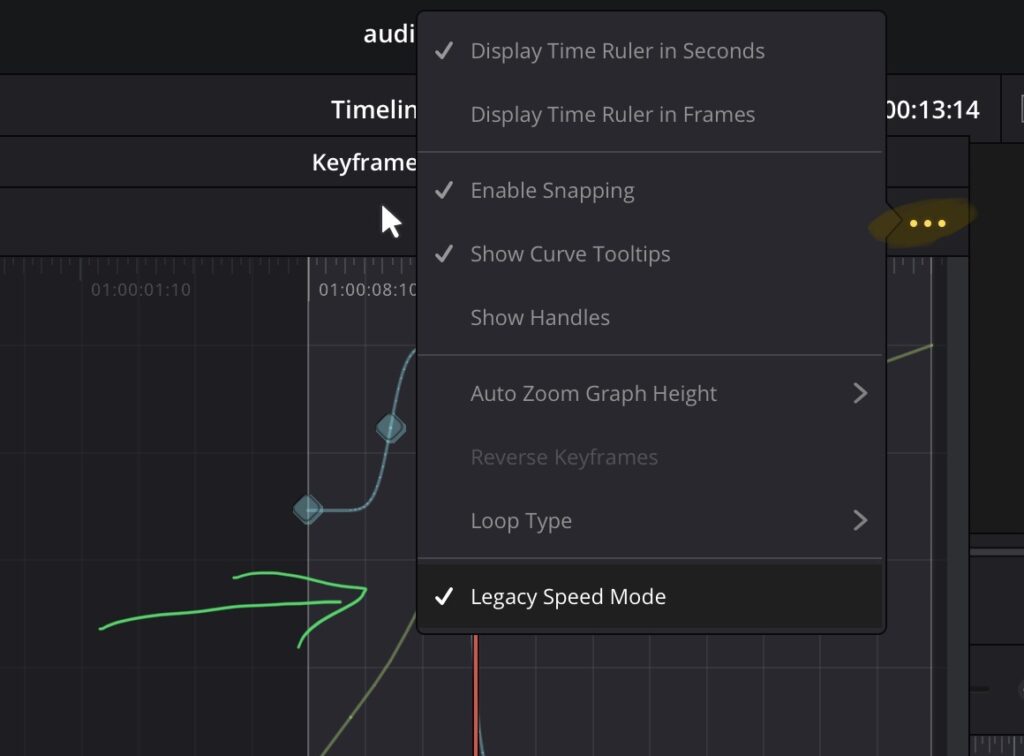
If the new behavior is not what you want, you can now go back to the way speed ramps worked in Version 18 to 20 by activating the Legacy Mode here.
Legacy Speed Mode or Standard Mode: Which one should you use?
You have to think about it like this. The new system that DaVinci Resolve 21 introduced is something like an automated assistant. It is like driving a car with an assistant that helps you figure out all the different points and speed points for you.
But since DaVinci Resolve 21 came out, the community noticed that the automated system sometimes does not do a proper job. Sometimes it analyzes all of these points too much. And when that happens, you can now switch back to Legacy Mode. There is no better or worse here. The Legacy Mode simply lets you be in control. That means you have to know more about the key points and the speed ramps, but if you change them, you are completely in control.
My advice: Always start with the new standard mode first. See if your speed ramp works. If it has issues at the beginning or the end of the speed ramp for whatever reason, switch to Legacy Mode and use the old way.
DaVinci Resolve iPad 21.0.3: The Full Changelist
DaVinci Resolve iPad Version 21.0.3 (07/22/2026)
• New legacy speed mode retime curve option.
• DNG pre tone curve is enabled by default in new projects.
• Addressed issue with adding keyframe at a subframe.
• Addressed issue with pasting keyframes to linked audio clips.
• Added configurable keyframe ease actions.
• Inspector frame display for interlaced transition durations.
• Addressed interlaced generator and transition duration interpretation.
• Addressed audio duration for inserted segment of interlaced media.
• Addressed field dominance detection issue for some interlaced clips.
• Addressed issue with rendered Magic Mask for photos in album.
• Addressed bezier window move when adjusting vertex smoothness.
• Addressed preview issue with HDR still exports on some browsers.
• Addressed wrong audio mapping scripting results in some scenarios.
• Updated DaVinci Resolve 21 reference manual.
• General performance and stability improvements.
Tip: If you don’t know how to get the other pages (FUSION, FAIRLIGHT, EDIT) on the iPad read this article first: How to UNLOCK ALL PAGES in DaVinci Resolve for iPad Pro
And in case you have not seen the big update video yet: i released the DaVinci Resolve 21 All Features Explained video. That is a 1 hour 25 minute video where i go through all of the big changes we got with DaVinci Resolve on the iPad. Definitely check that one out, there are a lot of gems in there you will probably never see in any other video: DaVinci Resolve iPad Version 21.0 All Features explained
If you want to host your own Online Course use CC360
I really believe, that CC360 is the best Platform to host your own Online Course currently on the market. And each week they introduce new features. Amazing. Check it out here.
BONUS: All DaVinci Resolve iPad Masterclass Students get the Transition Pack & the 8K Film Grain Pack for FREE!
You can either get the Transition Pack separate here: Seamless Transition Pack for DaVinci Resolve iPad. Or the 8K Film Grain Pack here: 8K Film Grain Bundle. but all of our DaVinci Resolve iPad Packs are a FREE Bonus for the DaVinci Resolve iPad Masterclass Students.
Check It Out here DaVinci Resolve iPad MasterClass: From Beginner To Pro.
Read Next
• How COPY Color Grade to MULTIPLE Clips in DaVinci Resolve iPad
• DO THIS to make DaVinci Resolve FASTER! (Instead of rage smashing your iPad)
• How To Delete Cache Files in DaVinci Resolve iPad
• How To Color Correct iPhone Footage in DaVinci Resolve iPad
• Easy Sync Audio & Video in DaVinci Resolve iPad



![Grainy Night Shots? [This Fixes It!]](https://exlima.net/wp-content/uploads/2026/10/Grainy-Night-Shots-This-Fixes-It-1024x576-394x330.webp)